
A damaged phone can disrupt your work, communication, and daily routine. If you cannot visit a repair shop in person, mail-in phone repair offers a convenient way to get your device checked and repaired without making an unnecessary trip. You can prepare your phone at home, pack it carefully, and send it to a repair provider for inspection.
However, sending a phone through the mail requires a little planning. You need to protect your personal information, choose suitable packaging, follow shipping rules, and understand how the repair process works. A few simple steps can help prevent shipping damage and avoid unnecessary delays.
At iPC Repair Houston, customers can explore repair options and confirm the appropriate process for their device. Before sending your phone anywhere, make sure you understand the provider’s instructions, shipping arrangements, estimated turnaround time, and repair policies.
What Is Mail-In Phone Repair?
Mail-in phone repair allows you to send a damaged smartphone to a repair provider instead of visiting a physical location. The provider receives the device, inspects the problem, explains the available repair options, and arranges its return according to the agreed service terms.
This option can help people who live far from a repair shop or have busy schedules. A phone repair by mail process may cover common problems such as cracked screens, charging issues, battery problems, faulty buttons, and other hardware faults, depending on the provider’s capabilities.
How Does the Repair Process Work?
The process usually starts with a service request. You describe the problem, provide the phone’s make and model, and follow the provider’s instructions for shipping the device.
After the package arrives, the technician examines the phone and determines what repair it needs. Depending on the service policy, you may receive a quote for approval before work begins. Once the repair and testing are complete, the device is prepared for return shipping.
Which Devices Can You Send?
Many repair providers accept different phone brands and models, but availability varies. A mail-in cell phone repair service may handle selected older devices as well as newer smartphones.
A mail-in smartphone repair service can be useful when your device has a problem that requires professional inspection. Always confirm model compatibility, repair availability, pricing, and shipping instructions before mailing your phone.
Why Choose Phone Repair by Mail?
A phone repair shipping service can save time when traveling to a repair location is difficult. Instead of arranging a visit, you can follow the provider’s process from home and use a suitable carrier to ship your device.
This approach may also give you access to technicians who work with your particular phone model. When you send your phone in for repair, choose a provider that communicates clearly about costs, repair options, estimated timelines, and return shipping.
Convenience for Busy Phone Owners
People often depend on their phones for work, navigation, online banking, and family communication. Finding time to visit a repair shop can be challenging, especially when the nearest suitable technician is far away.
When you ship your phone for repair, you can arrange the shipment around your schedule. Before sending it, however, consider how you will manage without your phone. Arrange access to important contacts, authentication methods, and essential accounts if necessary.
When Is Mail-In Repair a Good Choice?
Mail-in service may suit you if your phone has a cracked screen, a charging problem, or another repairable issue that does not require immediate local attention. It may also help when local repair options do not support your device model.
A phone repair by shipping arrangement is not always the best choice for urgent situations. If your phone has a swollen battery, is unusually hot, or shows signs of battery damage, do not package it like an ordinary device. Ask the repair provider and shipping carrier how to handle it safely.
How to Prepare Your Phone Before Shipping
Before you learn how to mail a phone for repair, prepare the device properly. Good preparation protects your information, makes inspection easier, and reduces the chance of misunderstandings about the phone’s condition.
If you want to know how to ship a phone safely, begin by checking the provider’s instructions. Some providers request photographs, proof of purchase, a repair authorization, or specific information about the reported fault. Follow those instructions before packing the device.
Back Up Your Phone Data
A repair can sometimes require testing, software work, or other procedures that may affect stored information. Back up your important files before shipping whenever the phone still works, and you can do so safely.
For example, save important photographs, contacts, documents, and messages using a trusted backup method. If you cannot access the device because the screen or operating system has failed, tell the provider before sending it. Do not assume that every repair will preserve every file.
Protect Your Personal Information
Take reasonable steps to protect phone data before repair. Review your device’s privacy settings, sign out of sensitive accounts where appropriate, and follow the repair provider’s instructions about screen locks and diagnostic access.
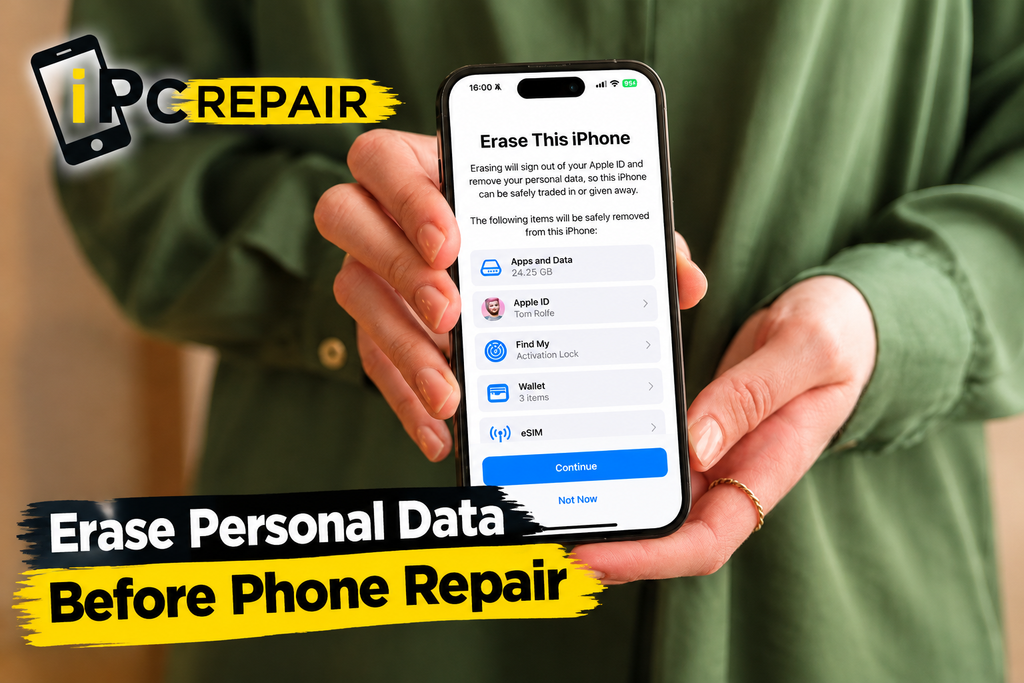
If the phone works and you have a verified backup, consider whether a factory reset is necessary. You should not erase data automatically if you need to recover files or if the device cannot be backed up. Ask the provider what access is required and what privacy safeguards are available.
Remove Your SIM Card and Accessories
Before packing the device, remove SIM card before phone repair unless the provider specifically instructs you otherwise. Keep the SIM card in a safe place so you can use it with another compatible phone if needed.
You should also check whether the provider needs any accessories. Unless requested, avoid sending charging cables, cases, memory cards, or other extras. Removing unnecessary items makes packing simpler and reduces the chance of losing accessories during transit.
Should You Erase Personal Data?
The decision to erase personal data before phone repair depends on the device’s condition, your backup status, and the repair requirements. A factory reset can protect information, but it can also permanently remove files that you have not saved elsewhere.
Before resetting your phone, confirm that your backup is complete and accessible. If you cannot back up the device, ask the provider about its repair process and data-handling policy. Never share account passwords unnecessarily; use only the access method the provider specifically requires.
How to Ship a Phone Safely for Repair
Shipping a phone for repair safely starts with choosing the right materials and preventing the device from moving inside the package. A smartphone can be damaged by drops, pressure, or repeated movement during transportation, even when its screen already appears broken.
Follow the provider’s smartphone repair shipping instructions carefully. Confirm the correct shipping address, required paperwork, approved carrier, and whether you should use a supplied shipping label. Keep a record of the instructions in case you need to refer to them later.
Choose the Right Phone Repair Shipping Box
Select a sturdy box that gives your phone enough room for protective cushioning. The device should not touch the outer walls directly, and the box should not be so large that the phone can move around.
A suitable phone repair shipping box should remain secure when handled during transit. Avoid thin envelopes or soft mailers for an unprotected smartphone because they may not provide sufficient resistance to crushing or impact.
Wrap the Phone with Protective Packaging
The best way to package a phone for shipping is to cushion it on every side and prevent direct contact with hard surfaces. If the provider supplies packaging, follow its directions rather than adding materials that might interfere with the shipping process.
For ordinary devices without battery damage, you may use appropriate cushioning materials and bubble wrap phone shipping techniques when permitted by the provider and carrier. Wrap the device securely without placing excessive pressure on the screen or buttons. Keep the phone separate from loose accessories.
Prevent Movement Inside the Package
Good phone shipping packaging tips focus on stability. Place the protected device in the center of the box and fill empty spaces with suitable cushioning so it cannot slide from one side to another.
Use protective packaging for smartphones that can absorb ordinary bumps during handling. Close the box temporarily and gently check whether the device moves inside. If it shifts, add more cushioning before sealing the package securely.
Seal and Label the Package Correctly
Check the shipping address, return details, and any required repair authorization information before sealing the box. Use strong packing tape on the package’s seams and attach the shipping label according to the carrier’s instructions.
When shipping a broken phone, take clear photographs of the device and its packaging before handing the parcel over. These pictures can help document its condition if questions arise later. Keep the receipt and tracking number until the phone has been returned and you have checked the repair.
What If the Phone Has a Damaged Battery?
A phone with a swollen, punctured, leaking, or unusually hot battery needs special attention. Do not press the battery, attempt to flatten the device, or pack it using ordinary shipping methods.
The rules for shipping a damaged smartphone depend on the nature of the damage and the carrier’s requirements. Contact the repair provider and carrier before shipping. Some battery conditions require specialized handling or may make transport by ordinary mail unacceptable.
Common Shipping Mistakes to Avoid
Even careful customers can overlook small details when preparing a phone for transport. Avoiding a few common mistakes can help protect the device and make the repair process smoother.
Before sending your package, review this checklist:
- Use a strong box rather than a thin envelope.
- Cushion the phone on every side.
- Confirm the shipping address with the provider.
- Remove accessories that the provider did not request.
- Photograph the phone before packing.
- Keep your receipt and tracking information.
- Follow all carrier rules for lithium-ion batteries.
If you need phone repair insurance, check what protection the carrier offers and whether it covers the phone’s actual value. Shipping insurance, declared value, and carrier liability are not always the same thing. Read the terms carefully before purchasing additional coverage.
Also, do not assume that a package marked as delivered means the repair provider has inspected the phone. Allow time for receiving, processing, and inspection, and contact the provider if the tracking information shows an unexpected delay.
How Long Does Mail-In Phone Repair Take?
The phone repair turnaround time depends on several factors, including shipping distance, the device model, the type of damage, parts availability, and the provider’s workload. Some repairs are straightforward, while others require additional diagnostic work or special components.
If you want to know how long mail-in phone repair takes, ask the provider for an estimate that separates shipping time from repair time. A quoted repair duration may begin only after the device arrives, passes inspection, or receives approval for the repair.
Shipping and Inspection Time
The first stage includes transit to the repair location and processing after delivery. Weather, weekends, holidays, and carrier delays can affect when the package arrives or when the provider begins inspection.
A fast mail-in phone repair experience depends partly on how quickly you provide the necessary information and approve any quoted work. Include accurate contact details and respond to repair-related questions promptly to avoid preventable delays.
Repair, Testing, and Return Shipping
After inspection, the technician may need to replace a component, test the device, or investigate additional faults. If the required part is unavailable, the repair may take longer than expected.
Once the repair is complete, ask when the provider will arrange phone repair return shipping and whether you will receive a tracking number. The return journey adds time, so avoid assuming that repair completion means the phone will arrive at your door immediately.
How Can You Avoid Delays?
A few simple actions can help keep the process moving:
- Describe the problem accurately when submitting the repair request.
- Confirm that your phone model is supported.
- Follow packaging and shipping instructions.
- Approve repair costs promptly after reviewing the quote.
- Monitor tracking updates and respond to provider messages.
You should also confirm whether the provider offers tracking updates for the incoming package, the repair stage, and the return journey. Tracking availability differs by service, so ask what information you will receive before sending your device.
Mail-In Phone Repair Cost: What Affects the Price?
The mail-in phone repair cost depends on the phone model, the fault, the parts required, and the amount of labor involved. A simple screen replacement may have a different price from a complicated charging, motherboard, or water-damage repair.
When comparing an affordable mail-in phone repair option, look beyond the initial quote. Ask whether diagnostic fees, replacement parts, labor, shipping, taxes, and return delivery are included. A clear estimate makes it easier to understand the total cost before authorizing any work.
Ask for a Quote Before Repair
Describe the symptoms and provide the exact phone model to help the provider assess your request. If the device has several problems, mention all of them rather than focusing only on the most obvious damage.
A reliable mail-in phone repair service should explain the available options and the terms that apply if the technician finds additional damage. Read the warranty and cancellation policies carefully, and confirm whether you must approve extra charges before the repair continues.
Understand Shipping and Insurance Fees
The total expense may include packaging materials, outbound shipping, return shipping, and optional insurance. These charges can vary depending on the carrier, delivery speed, package value, and destination.
Ask for a written breakdown so you can compare the full price fairly. Do not choose a service based only on a low advertised repair fee if other necessary charges are unclear. The best option is one that offers suitable repairs, transparent pricing, and clear communication.
iPhone, Samsung, and Android Repair Options
Different devices use different components, designs, and repair procedures. Before arranging mail-in iPhone repair, confirm that the provider supports your exact model and can address the problem you have described.
The same applies to mail-in Samsung phone repair. Screen technology, battery design, and component availability can differ between models. Provide the model number when requested, and ask whether the provider needs any special preparation before the device is shipped.
What About Other Android Phones?
A mail-in Android phone repair service may support selected devices from several manufacturers, but compatibility is not universal. Older phones can have limited parts availability, while newer models may require specialized components or testing procedures.
If you need mail-in phone screen repair, explain whether the screen is cracked, unresponsive, flickering, or completely black. If the issue involves power or battery performance, describe those symptoms as well. Accurate information helps the technician understand the problem before inspecting the device.
Battery Replacement by Mail
A mail-in phone battery replacement may be possible when the provider supports your model, and the battery condition meets shipping requirements. Normal battery wear is different from a battery that is swollen, leaking, punctured, or overheating.
Tell the provider if the phone shows unusual heat, a lifted screen, or visible battery swelling. Do not send a potentially hazardous battery through ordinary shipping without receiving appropriate instructions from the repair provider and carrier.
How to Choose a Reliable Mail-In Phone Repair Service
Choosing the right provider is just as important as packing the phone correctly. Look for clear contact information, written repair policies, transparent estimates, and a process that explains what happens after the device arrives.
A nationwide phone repair service can be convenient if it genuinely accepts devices from your location and explains its shipping coverage. Before relying on an online phone repair service, confirm its supported models, payment terms, privacy practices, and return arrangements.
Check Policies, Warranty, and Communication
Review the repair warranty and ask what it covers. Find out whether the warranty applies to the replaced component, the workmanship, or both. Also confirm what happens if the technician cannot reproduce the reported fault or discovers additional damage.
Good communication matters throughout the process. A provider should explain how to submit a repair request, where to send the device, how approval works, and how return delivery is arranged. Keep copies of relevant emails, estimates, receipts, and shipping records.
Confirm Whether Pickup and Delivery Are Available
Some providers offer shipping labels or coordinated delivery, while others expect customers to arrange their own shipment. Do not assume these services are included.
If you are looking for phone repair pickup and delivery, ask whether collection is available at your address and whether it costs extra. Confirm the service area and collection schedule before booking. Clear expectations help prevent confusion and unexpected expenses.
Start Your Repair with iPC Repair Houston
If your smartphone needs professional attention, iPC Repair Houston can be a starting point for exploring your repair options. Visit the company website to review available services and contact the team for current information about supported devices, shipping arrangements, and repair estimates.
Before sending your phone, confirm the correct procedure, prepare your data, and package the device according to the provider’s instructions. Understanding the process in advance can make mail-in phone repair more manageable and help you avoid unnecessary delays.
Frequently Asked Questions
How Do I Mail a Phone for Repair?
Contact the repair provider first and confirm that it accepts your device model. Follow its instructions, back up important information if possible, remove unnecessary accessories, package the phone securely, and use a suitable shipping method with tracking when available.
Is It Safe to Ship a Broken Phone?
A phone with ordinary screen damage may be shippable when packaged correctly and accepted by the carrier. However, a device with a swollen, leaking, punctured, or overheating battery requires special handling. Ask the provider and carrier for instructions before shipping it.
Should I Back Up My Phone Before Sending It?
Yes, if the device works and you can back it up safely. Repairs can sometimes involve procedures that affect stored information. If you cannot access the phone, tell the provider and ask about data-preservation options before authorizing work.
Can I Track My Phone During Repair?
You can often track the package while it travels to the repair location and again during return shipping if tracking is provided. Repair-stage updates depend on the provider’s process, so confirm what updates are available before sending your device.
How Long Will the Entire Process Take?
The total time includes delivery to the repair location, receiving and inspection, repair work, testing, and return shipping. The exact duration depends on the device, parts availability, workload, and carrier. Ask for a current estimate before authorizing the repair.
Conclusion
Sending your phone away for service does not have to be complicated. With proper preparation, secure packaging, clear shipping instructions, and a realistic understanding of repair timelines, mail-in phone repair can be a convenient option for handling common smartphone problems. Back up your data when possible, protect your personal information, document the phone’s condition, and keep your tracking details until the device returns. For your next step, visit iPC Repair Houston to explore available repair options and confirm the correct process before shipping your phone.